

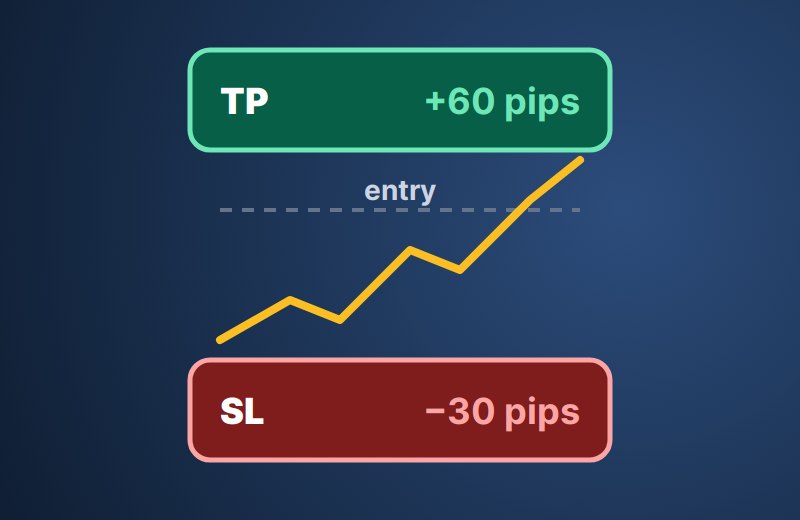
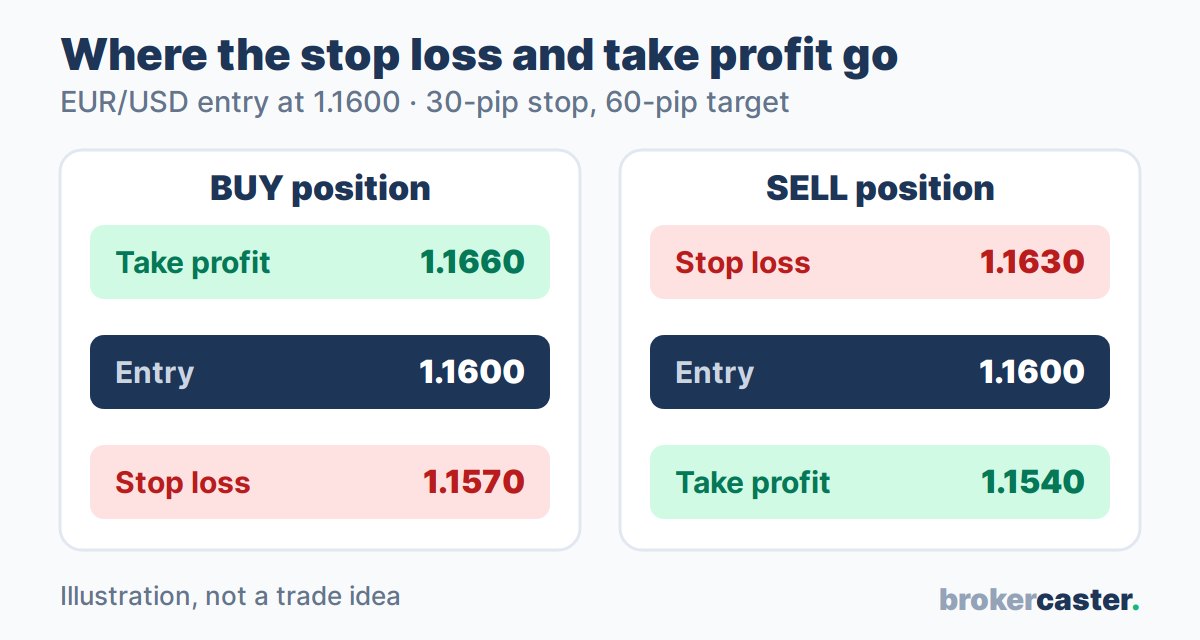
A stop loss is an order that closes your trade automatically when the price moves against you to a level you chose, so a loss stays at a size you planned. A take profit does the opposite: it closes the trade when the price reaches your target, so the gain is locked in without you watching the screen. On a buy position the stop loss sits below the entry price and the take profit above it; on a sell position it is the other way round. This lesson explains how both orders trigger, how to set them sensibly, how to turn them into money, and what can make a stop fill at a worse price.
What stop loss and take profit orders are
Both are closing orders attached to an open position. They do not open a new trade; they only decide when an existing one ends.
| Buy (long) position | Sell (short) position | |
|---|---|---|
| Stop loss | Below the entry price | Above the entry price |
| Take profit | Above the entry price | Below the entry price |
| Closes at | The bid price | The ask price |
A stop loss is a stop order: once the price reaches your level it becomes a market order and closes at the next available price. A take profit is a limit order: it closes at your price or better. That difference matters when the market moves fast, as the section on gaps below shows. Distances are usually measured in pips, so it helps to know what one pip is worth on your trade size.
How a stop loss and take profit are triggered
Every price has two sides: the bid (where you can sell) and the ask (where you can buy). The difference between them is the spread. A position always closes on the opposite side to the one it opened on:
- A buy position is closed by selling, so its stop loss and take profit trigger on the bid.
- A sell position is closed by buying, so its stop loss and take profit trigger on the ask.
This is why a sell trade can be stopped out even though the chart never touched your stop: most platforms draw charts from the bid, while your sell stop watches the ask, which sits one spread higher. When spreads widen, the ask can jump to your stop for a moment.
Once triggered, the stop becomes a market order. In calm markets it usually fills at or very near your level. In fast markets it can fill a few pips worse; this is called slippage. A take profit, being a limit order, normally fills at your price or better, so slippage on it works in your favour or not at all.
How to set a stop loss and take profit
A good stop is placed where your trade idea is proven wrong, not where the loss feels comfortable. Then the trade size is adjusted so that hitting the stop costs only the money you planned to risk. Common ways to choose the levels:
- Chart levels: the stop goes a little beyond a recent swing low (for a buy) or swing high (for a sell); the target goes before the next obvious level where price has turned before.
- Volatility: the stop is wider on a pair or day that moves a lot and tighter on a quiet one, so normal noise does not close the trade.
Then size the position from the stop, as shown in our lesson on lot size in forex:
Lots = money at risk ÷ (stop distance in pips × pip value of 1 lot)
Our lot size calculator does the sizing for any pair, gold or index, and the risk-reward calculator shows the reward against the risk and the win rate you need to break even.
The formulas
«Pip size» is 0.0001 on most pairs and 0.01 on yen pairs.
| What | Formula |
|---|---|
| Stop price, buy | Entry − stop pips × pip size |
| Stop price, sell | Entry + stop pips × pip size |
| Target price, buy | Entry + target pips × pip size |
| Target price, sell | Entry − target pips × pip size |
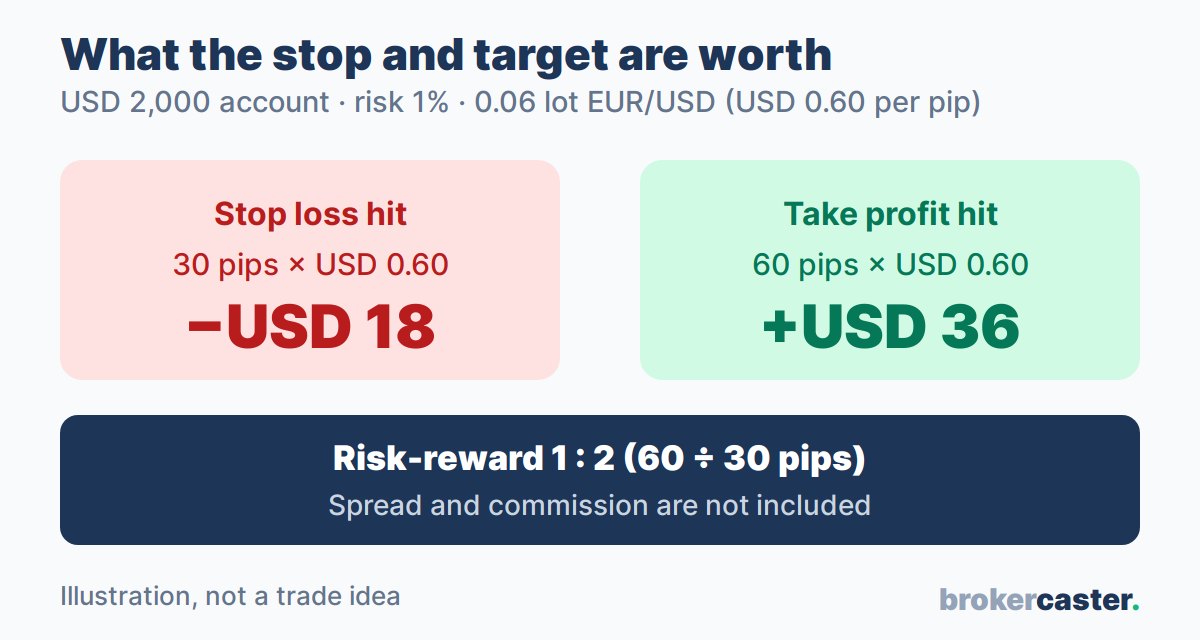
| Money lost at the stop | Stop pips × pip value per lot × lots |
| Money made at the target | Target pips × pip value per lot × lots |
| Risk-reward ratio | Target pips ÷ stop pips |
| Break-even win rate | 1 ÷ (1 + risk-reward ratio) |
With a 30-pip stop and a 60-pip target the ratio is 1:2, and the break-even win rate is 1 ÷ 3, about 33%: you would need to win a third of such trades just to cover the losers, before costs. Our pip value calculator gives the pip value for pairs where it is not USD 10 per lot.
Setting stops in MT4/MT5, cTrader and TradingView
Every major platform lets you attach both orders when you open a trade and change them later. The details differ:
| Platform | How to set them | What to watch |
|---|---|---|
| MT4 / MT5 | Type prices in the «Stop Loss» and «Take Profit» fields of the order window, or drag the dotted lines on the chart | The symbol's «Specification» shows the stops level: the minimum distance from the current price. A stop placed closer is rejected. |
| cTrader | Tick «Stop Loss» and «Take Profit» in the order window and enter pips or a price | Stops can be set in pips from the entry, which makes sizing easier; trailing is a separate option. |
| TradingView (broker connection) | Tick «Take profit» and «Stop loss» in the order panel; set price, ticks or money, or drag them on the chart | Options and units depend on the connected broker; check the risk figure the panel shows before you send. |
On MT4 and MT5 the stop loss and take profit sit on the broker's server, so they work even when your platform or phone is off. A mental stop, a level you plan to close at by hand, does not.
Gaps, guaranteed stops and negative balance protection at brokers
A normal stop loss cannot promise an exact price. When the market gaps, for example over a weekend or after surprise news, the first available price can be far beyond your stop, and the trade closes there. On a small account with a large position, a big gap can even push the balance below zero. Two broker features matter here:
- Guaranteed stop: the broker fills you at your exact stop price even through a gap, usually for a fee. In our review of IG, the Limited risk account puts a guaranteed stop on every position, and the fee is charged only if the stop is triggered.
- Negative balance protection: if a gap leaves your account below zero, the broker resets it to zero instead of asking you to pay the debt. If you never had a stop at all, the broker's margin call and stop-out level is the last line of defence.
Our reviews show how differently brokers handle a negative balance (checked November 2026):
| Broker | Negative balance protection |
|---|---|
| IG | Yes, for all retail accounts; not for professional traders |
| Pepperstone | Yes for retail clients; not guaranteed for Pro clients |
| Exness | Yes, reset to zero automatically after a stop out |
| HFM | Yes, reset to zero automatically |
| XM | Yes, per account (may be withheld for abuse or arbitrage) |
| IC Markets | No: clients bear negative balances after gaps |
| OANDA | No at OANDA Global Markets: clients are responsible |
| FXTM | No in the MetaTrader terms, except where local rules require it |
| Alpari | No: the client must pay any negative balance after a stop out |
The answer can change with the company you open your account with, so check the review and the client agreement for your own entity. You can compare all brokers on our forex brokers list.
Common mistakes with stop loss and take profit
- No stop at all. One bad trade without a stop can wipe out many good ones, and a gap can take the account below zero at brokers without protection.
- A stop chosen by money, not by the chart. Placing a stop 10 pips away because «I only want to lose USD 10» puts it inside normal noise. Choose the level first, then make the lot size smaller.
- Moving the stop further away when the price comes close. This turns a planned loss into a bigger, unplanned one.
- Targets that ignore the stop. A 10-pip target with a 50-pip stop needs a very high win rate to pay off; check the numbers with the risk-reward calculator first.
FAQ
What is a stop loss in simple words?
It is an instruction to your broker to close your trade automatically if the price reaches a level you set, so your loss cannot grow past the amount you planned (apart from slippage or gaps).
Where should I put my stop loss?
At the price where your reason for the trade is no longer valid, usually a little beyond a recent swing high or low, and far enough away that normal price noise does not reach it. Then choose a lot size so that hitting it costs only what you planned to risk.
Can a stop loss fail?
A standard stop loss always closes the trade once triggered, but not always at your exact price. In a gap or a very fast market it fills at the next available price, which can be worse. Only a guaranteed stop promises the exact price.
Why was my stop loss hit when the chart did not reach it?
Charts usually show the bid price. A sell position's stop triggers on the ask, which is higher by the spread. If the spread widened at that moment, the ask touched your stop even though the bid line did not.
Do I have to use a take profit?
No. Some traders close winners by hand instead. A take profit helps when you cannot watch the market.